
How to Recover a Website After Your Hosting Expired
You go to check your site and something is wrong. Maybe it is a suspension notice, maybe a blank screen, maybe a message that the account does not exist. If a hosting invoice slipped past you by a few weeks, that is almost certainly what happened. Recovering a website after hosting expires is more straightforward…
You go to check your site and something is wrong. Maybe it is a suspension notice, maybe a blank screen, maybe a message that the account does not exist. If a hosting invoice slipped past you by a few weeks, that is almost certainly what happened. Recovering a website after hosting expires is more straightforward than most people expect, and a lapsed billing cycle is not the same thing as a lost website.
Hosting expired vs domain expired: not the same problem
People mix these up constantly and it sends them fixing the wrong thing. Your hosting plan is where the actual files and database live. Your domain name is just the address pointing at those files. One can lapse without the other going anywhere.
| What you see | Most likely cause | What is at risk |
|---|---|---|
| Registrar parking page or “address not found” | Domain lapsed | The address, not usually the files |
| Host billing or suspension page | Hosting plan lapsed | Files and database |
| Database connection error or empty directory | Hosting lapsed or partly wiped | The database especially |
| Site loads but email stopped | Partial suspension | Email routing, files likely fine |
This guide covers the hosting side, where your files are actually at risk. If the domain lapsed, start at your registrar account instead.
What actually happens when a hosting bill goes unpaid
Most hosts do not delete your files the second an invoice is missed. There is usually a grace period somewhere between one and four weeks where the account sits suspended but everything is still on their servers. After that window the host can wipe it to free up space.
That is why acting fast matters here more than it does with most website problems. If the site went down in the last few days, log into the hosting dashboard or call support before you do anything else. Paying the overdue balance can switch everything back on within minutes, database and email included. No archive recovery gets you that.
Ask your host these questions before you assume the worst
Support teams can often do more than the automated billing page suggests. A specific question gets a real answer.
Ask whether the account is suspended or already terminated. Those are different states with different options available. Ask if they still hold a backup and how long they keep it after termination. Ask whether settling the balance today means they can reactivate it as it was. Ask if they can at least export the files and database even if they will not reactivate the plan. And ask for the exact deadline before the data is permanently gone.
Get whatever they tell you in writing. If the answer is that the data is already gone, that is your cue to stop negotiating and start the archive recovery.
Recovering the site if the host is not going to help
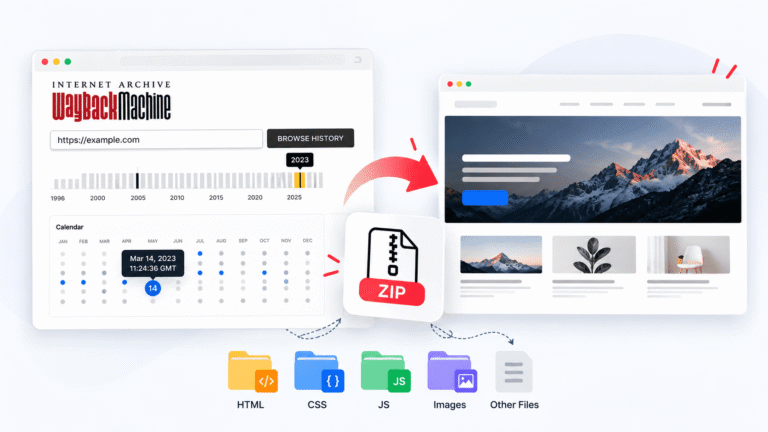
The Internet Archive has been crawling public websites for years, which means there is a reasonable chance it captured your site while the hosting was still active. RecoverYourSite’s website downloader pulls the pages, images, CSS, and JavaScript from that snapshot and packages everything into a ZIP file ready to upload to new hosting. There is a free preview covering 5 pages first, so you can confirm it captured the right version before you pay for anything.
What comes back and what does not
A hosting expired website recovery through the archive restores what the public could see. Anything that only ever lived in your database does not come back this way.
| Recovered from the archive | Not recoverable this way |
|---|---|
| Pages, posts, and written content | Customer accounts and passwords |
| Images, stylesheets, and layout | Order history and transactions |
| Navigation and internal links | Form submissions and enquiries |
| Everything a visitor could see | Email on the same account |
For a brochure site, a portfolio, or a blog, that first column is basically the whole website. For a store, your payment processor and email records will usually cover the order history the archive cannot.
Choosing the right plan
The main question is how many pages you actually need back.
| Plan | Pages covered | Link expiry | Best for |
|---|---|---|---|
| Free | 5 pages | 24 hours | Checking the snapshot is right |
| Basic, $9 one time | 500 pages | 48 hours | Brochure sites and small blogs |
| Pro, $29 one time | 5,000 pages | 48 hours | Large blogs, stores, multi-year archives |
Full plan details are on their pricing page.
Getting back online on new hosting
Once you have the files, pick new hosting and get it set up before you touch any DNS settings. Upload the recovered files, then open the site using the host’s temporary URL and click through every page while the live domain is still untouched. Only when that looks right do you update nameservers or DNS records to point at the new host.
DNS changes can take anywhere from a few minutes to a couple of days to fully propagate. If setting up hosting and handling file uploads yourself sounds like too much, this recovery service covers the move to new hosting, and there is also a WordPress rebuild option that turns a static file recovery back into a working editable dashboard. If the original site ran on WordPress and you want the admin panel back, that is the one worth looking at.
For picking the new host, this list of recommended tools covers hosting providers alongside backup, SSL, and security tools organised by where you are in the recovery process. Since you are setting up fresh anyway, it is a good moment to get backups configured properly from day one.
What to tell customers while the site is down
Recovery takes at least a day or two. A few small moves limit the damage in the meantime.
Get a holding page up on the domain with a working phone number and email address, even before the full site is ready. Update your Google Business Profile and any social accounts so people have somewhere to look. Check whether contact form enquiries were quietly failing before the site went down, because anything submitted during an outage is usually gone. And let anyone who depends on the site know roughly when it will be back so they stop guessing.
How to make sure this does not happen again
Turn on auto renewal for both hosting and domain billing. Use a billing email you actually check. Keep the card on file current because an expired card is the most common cause of an unintended lapse. Set a calendar reminder a week before renewal dates as a backup to whatever emails the host sends. Annual billing over monthly means fewer renewal dates to miss altogether.
And keep at least one backup somewhere other than your hosting account. A backup on the same server you just lost access to is not really a backup. If you are on WordPress, this free tool is one option, and the backup plugin comparison covers five solutions that store copies off your server automatically.
Frequently asked questions
How long do hosts keep files after hosting expires?
Roughly one to four weeks of grace period after suspension is common, but it varies by host. Some keep backups a while after termination too. The only reliable answer is whatever your specific host tells you, so ask directly rather than assuming.
Will I lose my Google rankings if the site was down for a while?
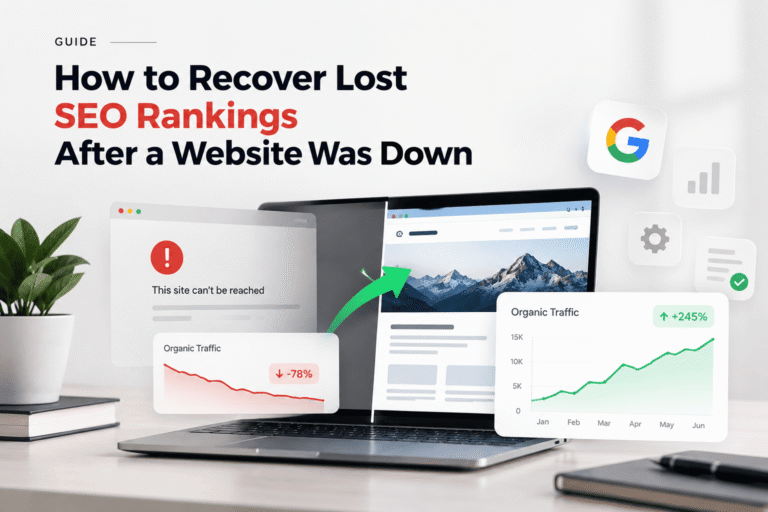
A short outage of a few days rarely causes permanent damage. Longer downtime is more of a concern. There is a full guide on recovering lost SEO rankings after a website goes down if that is where you are.
What if I do not remember which host I used?
Check your domain nameserver records through your registrar. They often still point at the old host even after suspension. Old invoice emails or a card statement search for words like “renewal” or “hosting” are usually faster if your inbox goes back far enough.
Can the free preview get my content back?
For a small site, yes. Five pages with a 24 hour link covers a simple brochure site. Anything larger needs the Basic or Pro plan to get every page before the link expires.
Does the domain expire at the same time as hosting?
Not usually. They are separate products with separate renewal dates, often bought from different companies entirely. It is common for one to lapse while the other is still perfectly fine, which is why working out which one failed is always the first step.
Is it cheaper to restore website after hosting expiry or rebuild from scratch?
Recovery is almost always cheaper and faster. Rebuilding means rewriting content, recreating layouts, and reproducing images that already exist in the archive. Recovery starts from what you already had, which also avoids the problem of a rebuilt site quietly losing the exact wording that was ranking for you.